Did the Renovation Work? The IPercept Renovation Report Shows You the Before-and-After Machine Health, Down to the Component Level
The machine is back from renovation. Did the work fix what it was meant to fix, and what is still wearing?
The machine is back from renovation. Did the work fix what it was meant to fix, and what is still wearing?
A Renovation Report answers that with measurements. It compares every monitored subsystem before and after the work, down to the component behind each finding.
In the example report used in this guide, a DMG MORI CMX 600 V was renovated. Its Z axis went from Critical to Stable once the defects in the Z-axis bearings and the coupling were fixed. The X and Y axes went from Accelerated to Stable, with ballscrew wear, backlash, worn guide rails and a carriage defect resolved. The milling spindle stayed where it was, with one observation on watch [1]. The company, machine and findings are illustrative.
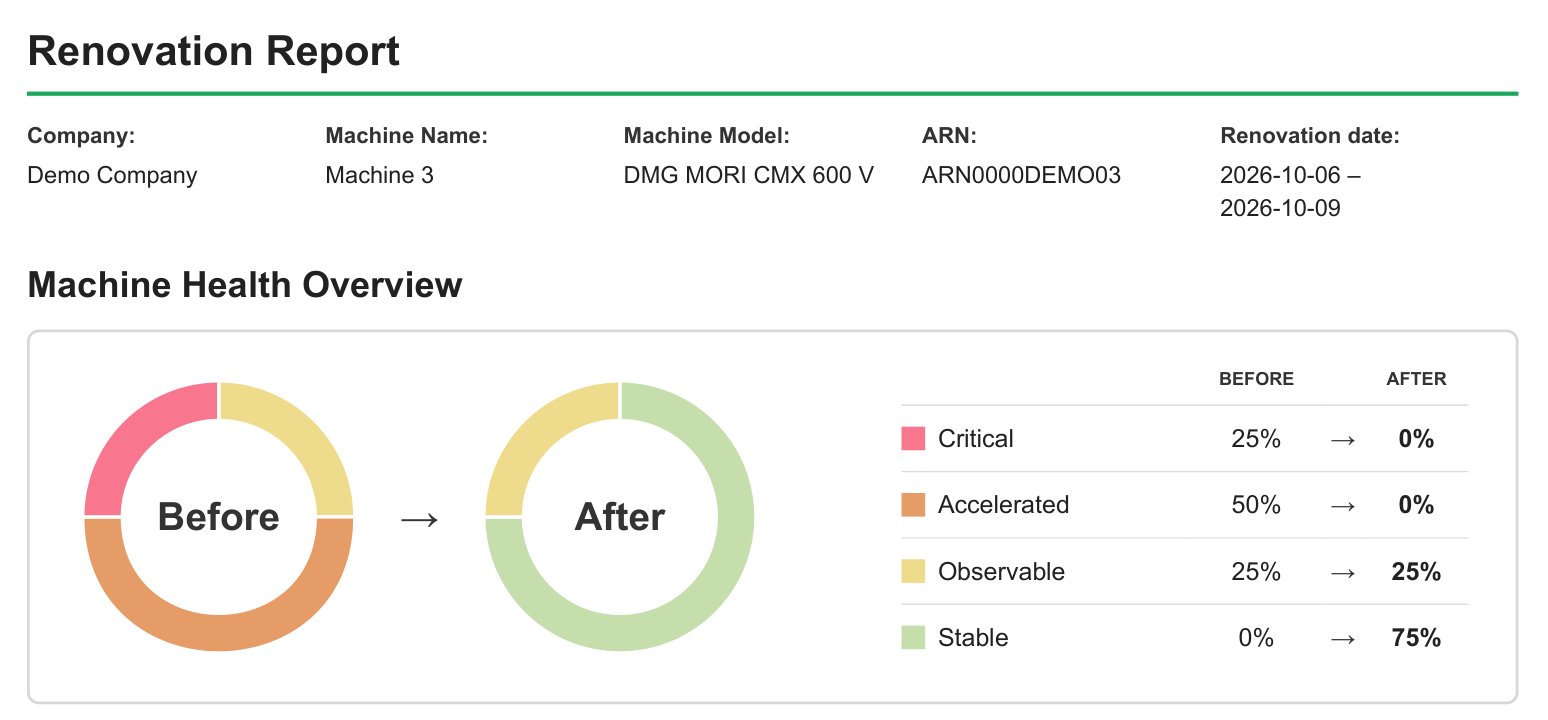
The overview shows how much of the machine got healthier
The Machine Health Overview shows the share of subsystems in each stage, before and after [1]. A drop in Critical and Accelerated, with a matching rise in Stable, means the work reached most of what was degraded.
In the example, one Critical and two Accelerated subsystems became three Stable ones. One subsystem stayed Observable [1].
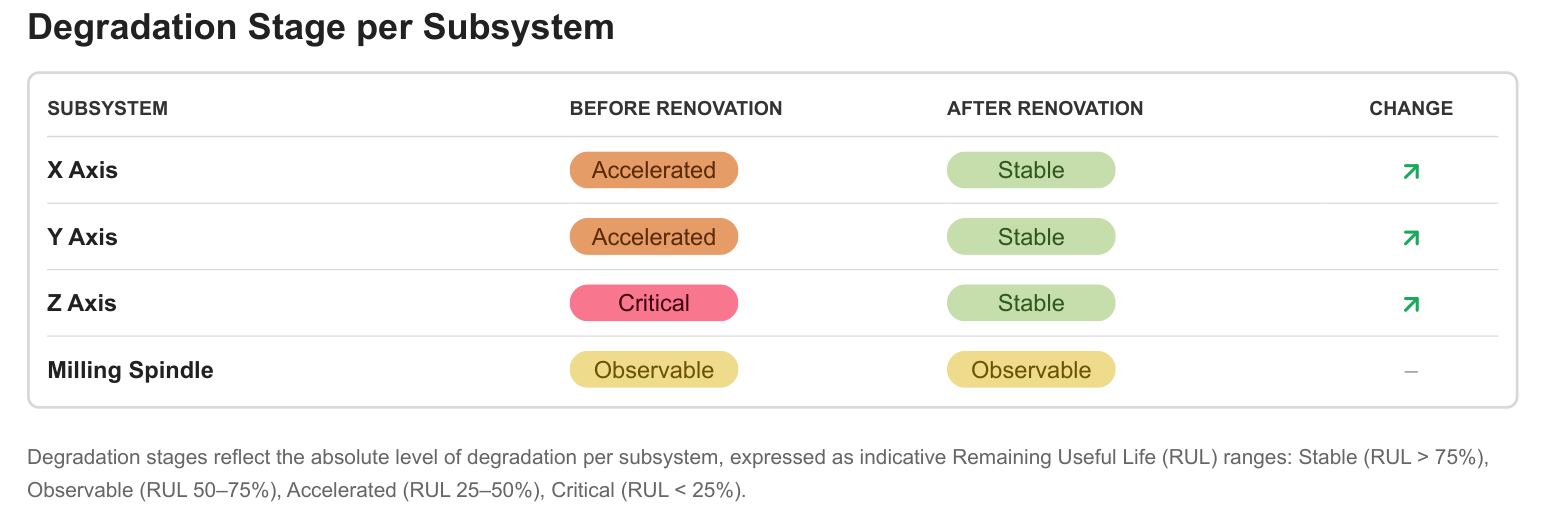
The subsystem table shows where the renovation made the difference
The table lists each subsystem with its stage before and after the work [1]. Hold it against the work order: whatever was in scope should have moved to a better stage.
In the example, the Z axis improved by three stages and the X and Y axes by two. The milling spindle is unchanged, which is the expected result if it was outside the scope of the renovation, and the first question for the renovation partner if it was inside [1].
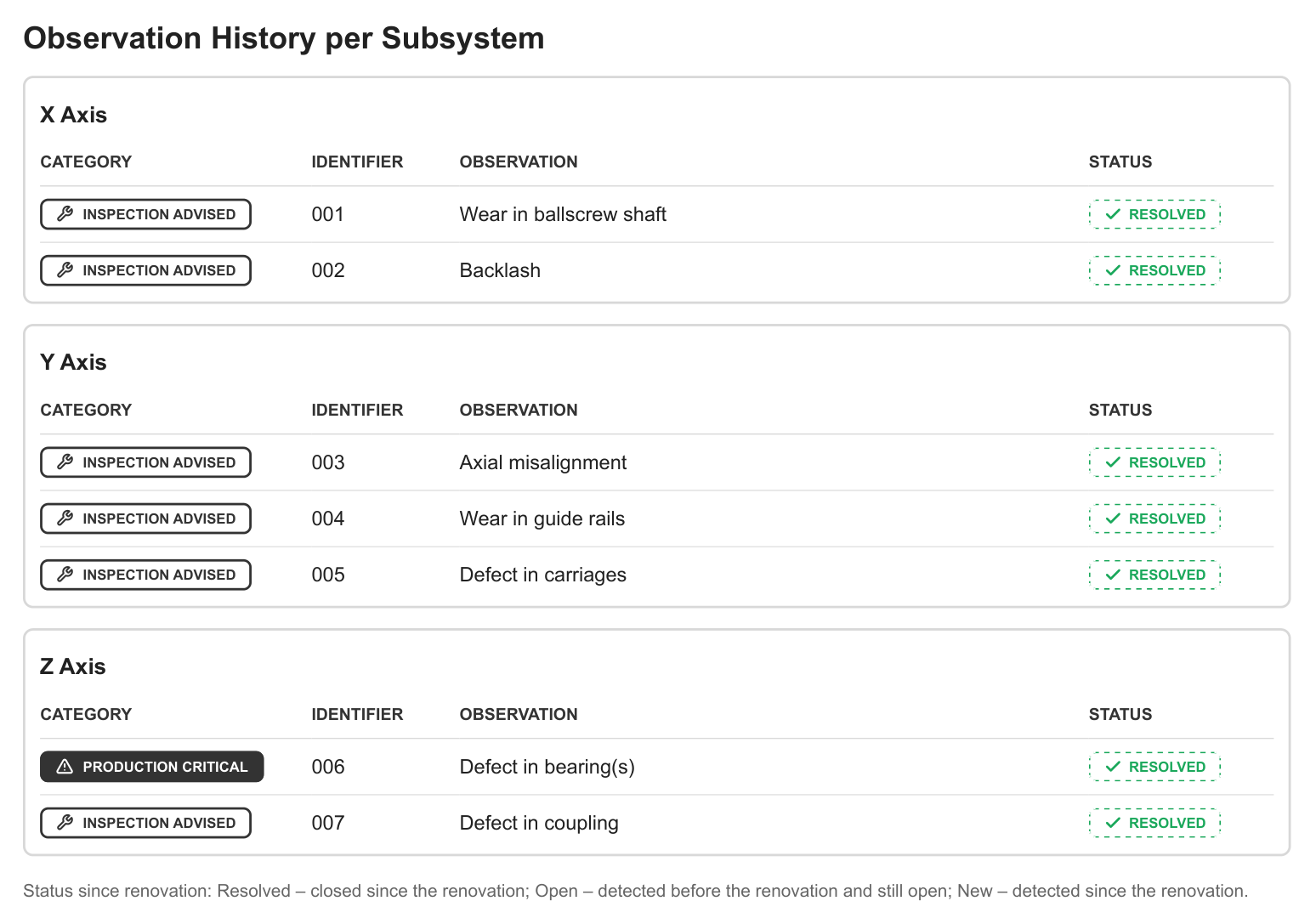
The observation history proves each finding was closed, component by component
The observation history is where the report shows the work down to the component. Every finding that was open before the renovation is listed with its status: Resolved, still Open, or New since the work [1]. Each finding keeps the same identifier from detection to resolution, so you can follow it from the report that triggered the work to the one that closes it [2].
In the example, all seven findings on the axes are Resolved [1]:
- X axis: wear in the ballscrew shaft and backlash
- Y axis: axial misalignment, worn guide rails and a defect in the carriages
- Z axis: a Production Critical defect in the bearings, and a defect in the coupling
With nothing Open or New, the axes are signed off at component level.
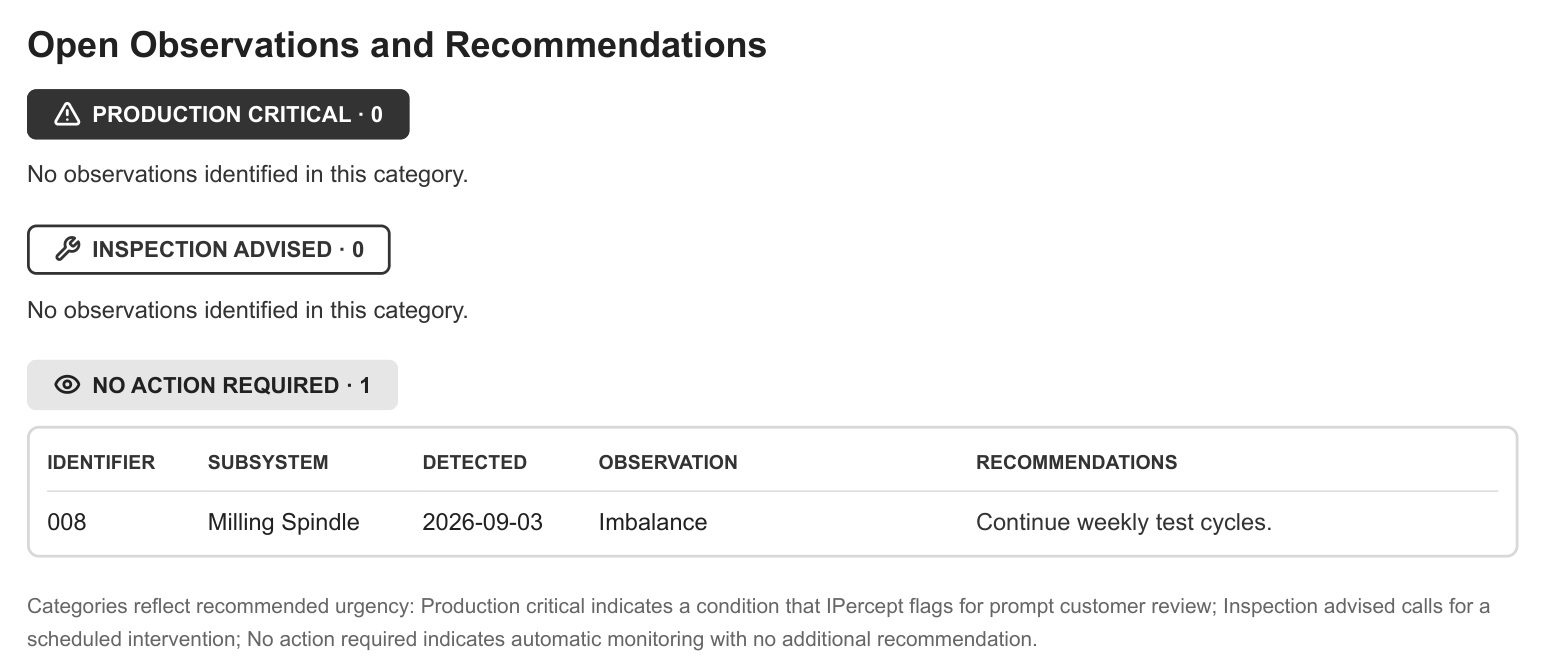
What stays open is your next maintenance plan
The last page lists the observations still open, grouped by urgency: Production Critical for prompt review, Inspection Advised for a scheduled intervention, and No Action Required for conditions IPercept keeps monitoring [2].
In the example, the first two categories are empty. One observation remains under No Action Required: imbalance on the milling spindle, with the recommendation to continue the weekly test cycles [1]. It explains why the spindle is still Observable, and it is the one item to watch.
Close a renovation in four steps
- Report the renovation to IPercept. IPercept analyses the impact and issues an updated report [2].
- Check the overview and the subsystem table. Everything in scope should have improved. Example: all three axes.
- Go through the observation history. Every finding the work targeted should be Resolved. Example: seven of seven.
- Plan what stays open and keep testing. Example: watch the spindle imbalance.
For the example machine, that means accepting the work on all three axes, the Z-axis bearings and coupling included, and confirming with the renovation partner whether the spindle was part of the job.
IPercept turns a renovation into measured proof
The Renovation Report is part of the Machine Health service. A Smart Device on the machine records its motion during IPercept's patented test cycle, and every finding is traced to the component behind it, so the report says "defect in the bearings" on the Z axis instead of "the Z axis needs attention" [2]. The set-up is standalone, with no integration into your IT infrastructure [3].
IPercept has measured the result of hundreds of repairs, component replacements and renovations on CNC machines, from major overhauls to yearly preventive maintenance [4][5]. In one published case, IPercept assessed the Z and B axes of a large machining centre after a major renovation and confirmed its earlier recommendations [5]. In another, a post-repair check on a 5-axis machine confirmed the main repair and found minor residual wear on one axis, which the customer handled by adjusting cutting parameters [4].
Book a demo with IPercept to see a Renovation Report for your own machines, down to the component.
References
- Machine Health Overview, Degradation Stage per Subsystem, Open Observations and Recommendations, Observation History per Subsystem — Machine Health (MH) Renovation Report (example): "Renovation Report" for Demo Company, Machine 3, DMG MORI CMX 600 V, renovation 2026-10-06 to 2026-10-09, generated 2026-10-29, pages 1 to 3 (Machine Health (MH) Renovation Report (example): "Renovation Report" for Demo Company, Machine 3, DMG MORI CMX 600 V, renovation 2026-10-06 to 2026-10-09, generated 2026-10-29, pages 1 to 3)
- Degradation stages, report after a machine event, observations and unique identifiers, urgency categories, Root Cause Analysis, patented test cycle — Machine Health Service Description (2026-09-15), sections 3.2, 3.3, 5 (Machine Health Service Description (2026-09-15), sections 3.2, 3.3, 5)
- Standalone set-up without integration into the customer's IT infrastructure — IPercept Information Security Framework (V1.7, 01/2025), Architecture (IPercept Information Security Framework (V1.7, 01/2025), Architecture)
- Same test protocol before and after a repair, post-repair comparison, residual wear and parameter adaptation — IPercept technical case study "Tracking the Effects of Axis Component Replacement" (UC12) (IPercept technical case study "Tracking the Effects of Axis Component Replacement" (UC12))
- Verification after a major renovation and after yearly preventive maintenance — IPercept Success & Use Cases (February 2026), "Renovation verification" and "Effect of standard yearly PdM" (IPercept Success & Use Cases (February 2026), "Renovation verification" and "Effect of standard yearly PdM")


